The angled deck, as drawn in the sim
Why a carrier's landing area is angled away from the ship's axis, and how the sim lays it out.
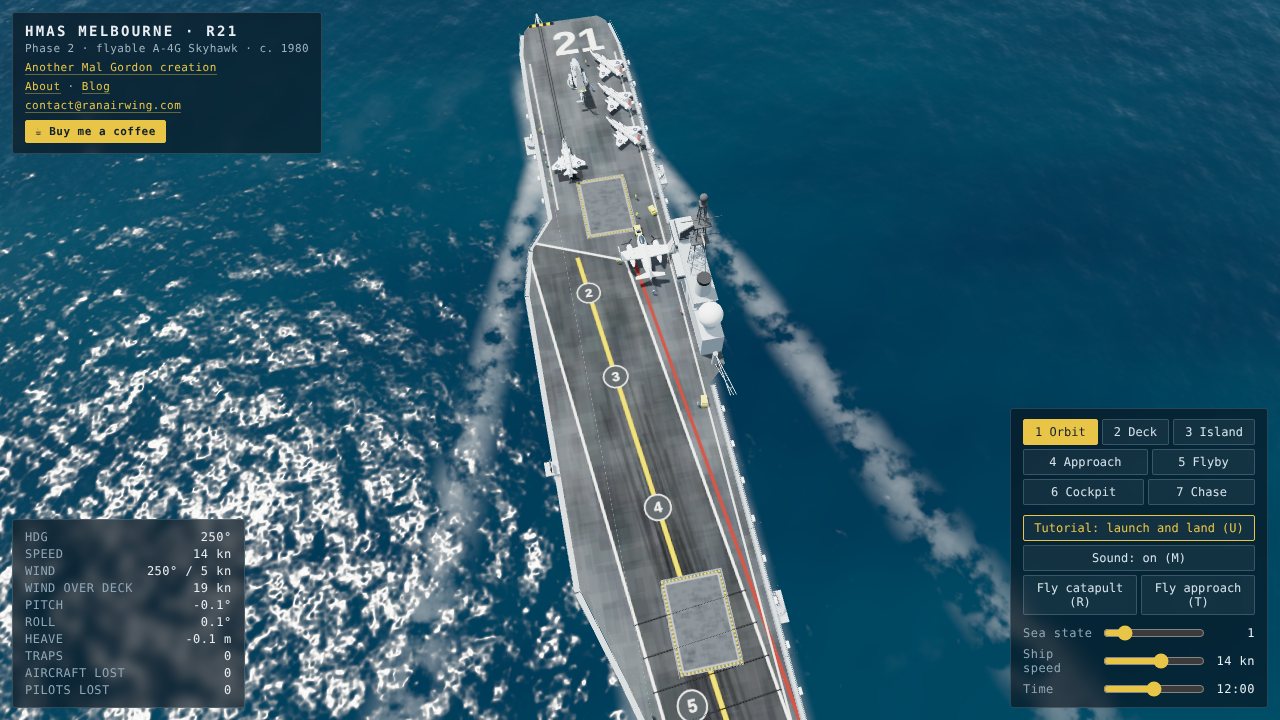
Look down on HMAS Melbourne in the sim and the landing area runs at a slight angle to the ship's centreline, toward the port side. That is the angled deck.
Why angle it
On a straight deck, an aircraft that misses the wires, a bolter, runs into the aircraft parked forward. An angled landing area points off to the side of the ship, so a bolter can keep going and fly away with full power. The angle also means aircraft can be launched and landed at the same time.
How the sim lays it out
- Angle. 5.5 degrees from the ship's axis, to the best of the drawings. The plan drawings were not measured exactly, so this is approximate.
- Centreline. A broad yellow line, with white lines along the edges.
- Foul line. A dull red line along the edge of the landing area.
- Wires. Five, placed along the angled deck.
- Mirror landing aid. On the port side, about amidships, so the pilot sees the ball while lined up with the angled deck.
What it means in play
Your landing line is not along the ship's centreline. The sim gives a line-up cue on the HUD: it reads "LINED UP" when you are on the angled deck's centreline and tells you to come left or right otherwise. See the ball for how the landing aid works.
Because the ship is moving, the deck also moves sideways relative to the air. The sim accounts for this when it sets up an approach, so the start puts you on the correct track. Flying it by hand is the interesting part.